
Businesses lose hours every week searching for files scattered across Drive, OneDrive, Dropbox, email, WhatsApp, and on individual computers. Wiki Hub ends the chaos by giving your company one central knowledge space inside WordPress. If your team depends on files and links, this is the structure you need.
Every business is drowning in files. Google Drive folders. OneDrive links. Dropbox assets. PDFs in WhatsApp. Documents sent in emails. Teams waste hours weekly looking for files and links instead of working.
After working with hundreds of businesses, one truth became clear. The problem is not the people. The problem is the system. So we built the fix.
Meet Wiki Hub, Your Company's Central Knowledge Space
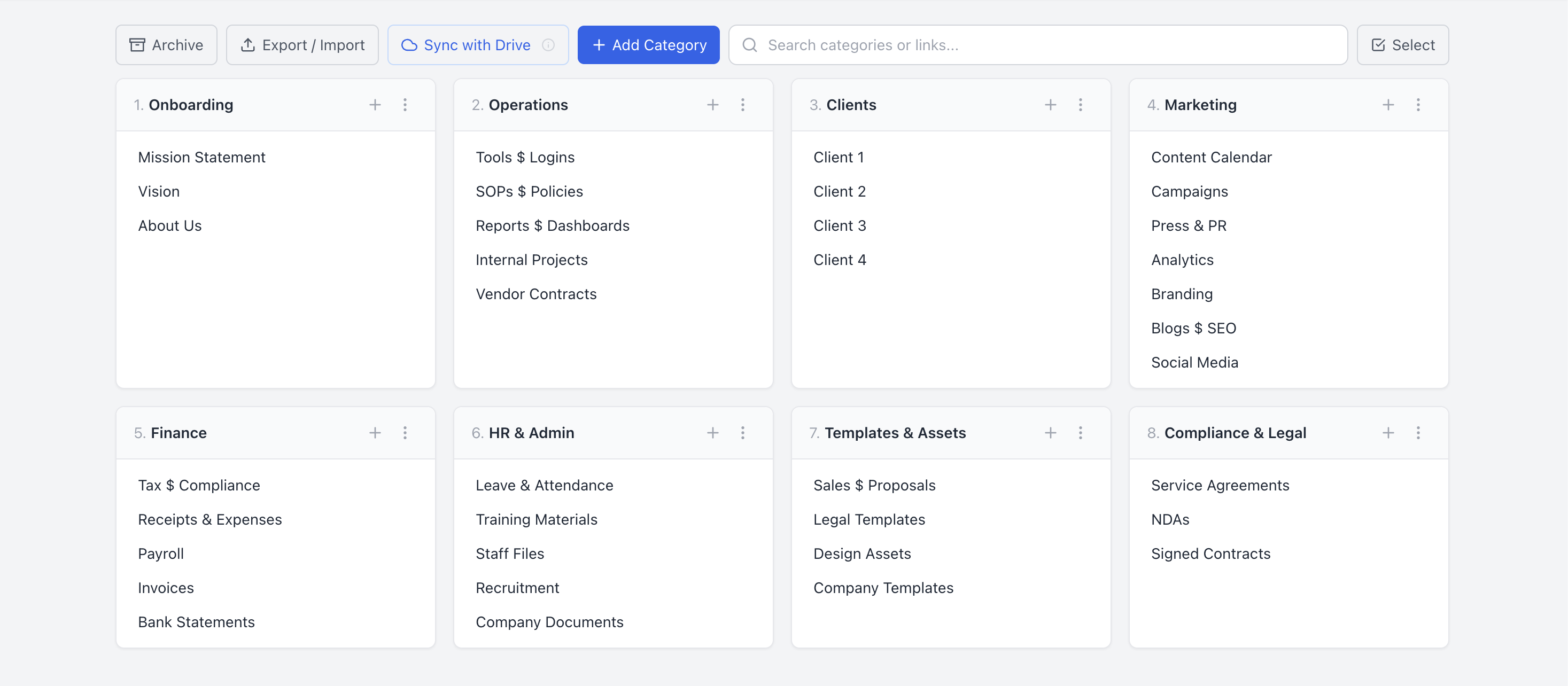
Wiki Hub is a simple, powerful tool that brings all your files, links, and folders into one organized hub inside WordPress. Whether your team works with:
- Google Drive (Business or Personal)
- Microsoft OneDrive
- Dropbox
- Shared servers
- Or mixed environments
Wiki Hub brings everything together in a single clean dashboard your team can access instantly. It is the closest thing to giving your company a "brain."
Why Businesses Need This Now
Centralize Everything
Instead of jumping between drives, chats, and emails, Wiki Hub creates a private, structured knowledge base your whole team can rely on.
Control Access
Assign who sees what: staff, client, admin, manager. Everyone only sees what matters to them.
Find Anything Fast
Structured search and clean categories mean files take seconds to find. No more folder hunts. No more chaos.
Works With Any Workspace
Wiki Hub works with any workspace. If it has a shareable link, it works.
Automation Ready
For power users, Wiki Hub supports automated Drive setup using Google Apps Script. Create hundreds of folders in seconds and plug them directly into the hub.
The Result
- Teams move faster.
- Businesses stay organized.
- Knowledge stops disappearing in chats.
- New hires onboard smoother.
- Managers finally get structure across all departments.
See It Live
We built an open demo for anyone who wants to try it, plus a full tutorial and complete product details:
Special Launch Offer
We are offering lifetime access for KSh 5,000. This is a limited offer.
Affordable, simple, and impact-driven. Perfect for teams who want clarity instead of chaos.
Final Thought
If your business runs on files, links, documents, and shared resources, you do not have a "nice-to-have" problem. You have a structure problem.
Wiki Hub solves it so your team can focus on what matters: delivering great work. If you would like help implementing it for your business, feel free to reach out.
- WikiHub, your company's central knowledge space.
- Your agency's biggest expense isn't payroll, the real cost of digital chaos.
- "Where's the link?", the four words costing agencies thousands.
- Your team is losing hours searching for links, build a team operations hub.
Frequently Asked Questions
What is Wiki Hub?
Wiki Hub is a simple, powerful tool that brings all your files, links, and folders into one organized hub inside WordPress. Instead of jumping between Google Drive, OneDrive, Dropbox, email, and WhatsApp, your whole team gets a single clean dashboard they can access instantly, making it the closest thing to giving your company a central brain.
What workspaces does Wiki Hub work with?
Wiki Hub works with Google Drive (Business or Personal), Microsoft OneDrive, Dropbox, shared servers, and mixed environments. If a file or folder has a shareable link, Wiki Hub can bring it into your central dashboard.
How much does Wiki Hub cost?
Wiki Hub has a special launch offer of lifetime access for KSh 5,000. This is a limited offer, designed to be affordable, simple, and impact-driven for teams that want clarity instead of chaos.
Can I control who sees which files in Wiki Hub?
Yes. Wiki Hub lets you assign who sees what by role, such as staff, client, admin, or manager. Everyone only sees the files and links that matter to them, which keeps the hub tidy and access appropriate.
Does Wiki Hub support Google Drive automation?
Yes. For power users, Wiki Hub supports automated Drive setup using Google Apps Script. You can create hundreds of folders in seconds and plug them directly into the hub, making it easy to roll out structure across many departments or projects.
Can I try Wiki Hub before buying?
Yes. There is an open demo you can try at https://wiki.ke/hub, a full tutorial video on YouTube, and complete product details at wpfoss.com/wiki-hub. You can explore exactly how Wiki Hub works before deciding.
How do I get help implementing Wiki Hub for my business?
If you would like help implementing Wiki Hub for your business, you can reach the WPfoss team by phone on 0722 334 188 or by email at hello@wpfoss.ke. The team can help you set up your central knowledge space and organize your existing files and links.
Give your company a central brain
Stop losing hours to scattered files and links. Try the live Wiki Hub demo, watch the tutorial, or reach out and we will help you set it up for your business.
Try the Live DemoPrefer a hand? Contact us · 📞 0722 334 188 · 📧 hello@wpfoss.ke